It builds the wall and packs it for you.
The Systainer wall planner.
Say how wide the wall is and which Systainers are on your shelf. StackDesign builds the run of cabinets that fits across it, packs your Systainers into them in the tightest arrangement it can find, and sizes every cabinet to whatever landed inside. You never sit there working out which Systainer goes where.
Systainer The system it knows today, 217 Systainers across five brands. More systems are coming.
Elevation, scale in mmBuilt and packed
Bank paid months before the beta ends: three from the code 3FREE on our business cards, and one more for every bug report that leads to a fix, up to six. Open beta terms.
Free during open beta. Sign up and use everything. Nothing to switch on and nothing renews: your beta starts the moment you sign in and runs until December 31, 2026. When it ends your account moves onto a plan with the first month on us, and if you never saved a card nothing is charged, so the planner stays open on our free plan. See what it costs after the beta, or read the open beta terms.
Two buttons build the whole wall.
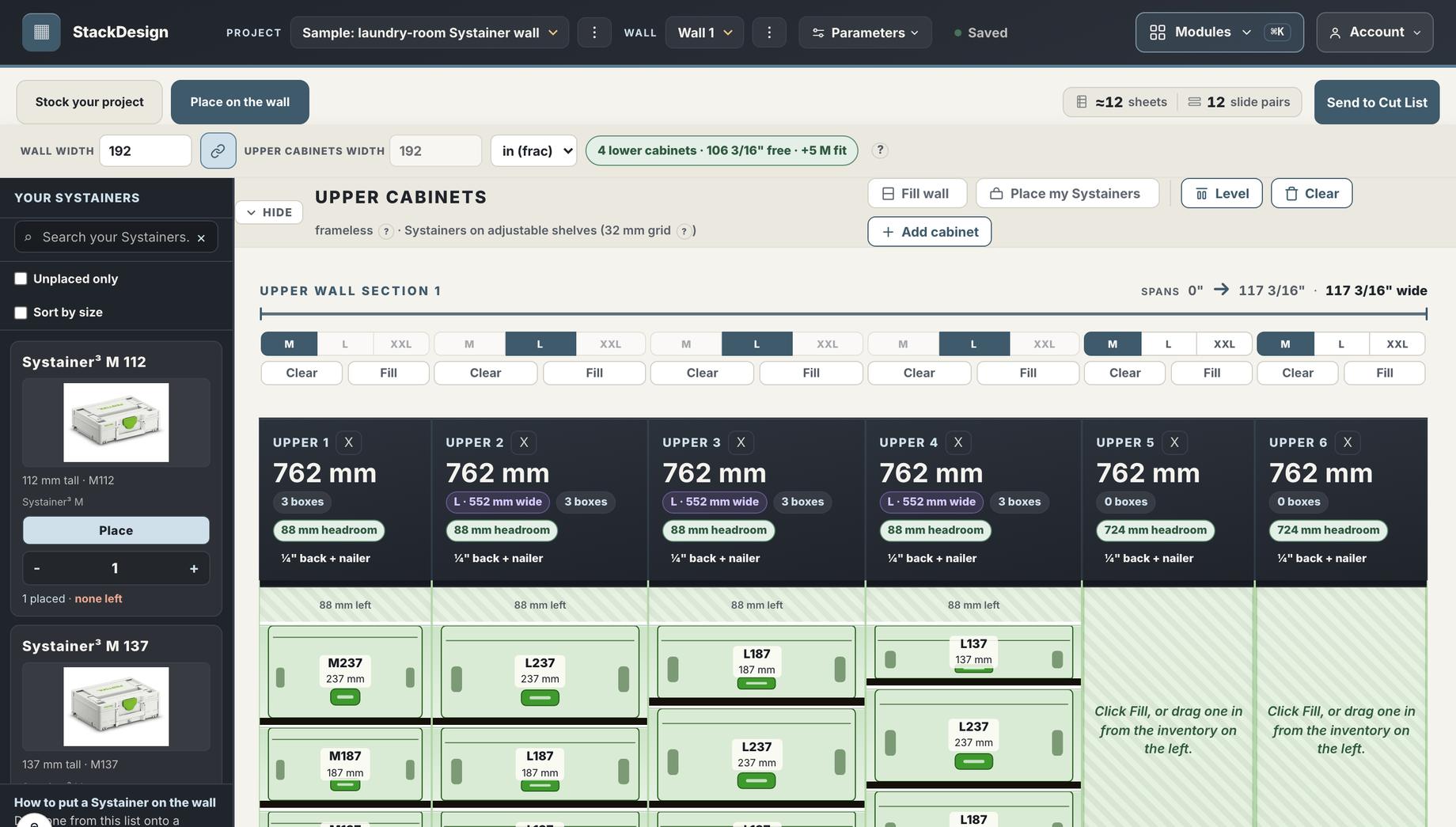
Fill wall reads the width you measured and drops in as many cabinets as that wall can take. Place my Systainers then loads every one you own that is not on the wall yet, working out for itself which belongs in which cabinet. One undo takes the whole thing back if you want to try it a different way.
One system today. Room for the rest.
StackDesign sizes a cabinet around the Systainers going into it, which only works if it knows those Systainers down to the millimetre. So systems go in one at a time and each one gets measured properly before it ships. The Systainer is done.
Systainer
Every Systainer measured: the outside sizes, the stacking heights, and the room a drawer slide and a tray actually need on each side. That is 217 Systainers across Festool, Benchdogs UK, Lamello, TSO Products and UJK, and it grows as new models ship.
What earns the next bay
A system earns a bay here once its units come in repeatable outside sizes, because that is what lets a cabinet be sized around them rather than guessed at. Measuring a system properly is slow work, so a system goes on this page the day its numbers are in, and not before. Tell us what you stack and it goes on the list.
How it works
From the Systainers on your shelf to parts on a sheet.
Five stages, and each one hands its work to the next. You never re-type a dimension, and nothing gets measured twice.
Say what you own
Search 217 Systainers and set how many of each are on the shelf.
Build the wall
Drop cabinets in and watch the bank draw itself to scale, sized to its Systainers.
Pick materials
Choose a material for each component from your own library.
Read the cut list
Every piece, its cut size, its grain and its edgebanding, in one table.
Cut the sheet
The optimizer nests every part on your sheets and hands back the offcut.
What you actually get to do in there.
These are the controls that are on the page today, grouped the way you meet them: you stock the project, you build the wall, and the settings sit behind both.
Stock your project
- Search by name or part numberType "systainer m", or the number off the label if that is what you have.
- Filter by categoryNarrow the whole catalog down to the kind of Systainer you are actually looking for.
- Set how many you ownYour counts belong to your account and follow you into every project.
- Unplaced only, and sort by sizeTwo switches on the shelf so you can see what is left to put on the wall.
- A running total of what to buyPlace a Systainer you do not own yet and it starts counting, right beside the plan.
- An inventory reportA page listing what you own, for when you want it on paper.
Build the wall
- Level and clearOne button each: line every top up across the run, or empty a cabinet back to your inventory and start it again.
- Drag a Systainer in by handPull one off the shelf into the exact cabinet and the exact slot you want it in.
- Lower and upper cabinets width, each with a live readoutType either run's width and it tells you how many cabinets fit before you place a single one.
- Uppers on their own widthUnlink the upper run when it does not follow the wall underneath it.
- Standard, flat or stepped topsChoose how the tops read across cabinets that are not the same height.
- Snapping you pickSystem-32, 16 mm, 1/8 inch, or 1 mm when you want it exact.
Set it up, and keep it
- Simple and ProStart with the handful of settings that matter, open the rest when you want them.
- A material for every componentCarcass, back, nailer, stretcher, tray and shelf each pick their own from your library.
- Edgebanding worked out per edgeIt reads which edges show and draws them, so there is no role to remember.
- Five units, everywheremm, cm, decimal inches, fractional inches, or feet and inches.
- Undo on anything destructiveClear a cabinet by mistake and take it straight back.
- Projects, walls and syncSeveral walls in a project, several projects in an account, saved as you work.
A sysport sized to the Systainers you own.
On the Festool forums a cabinet like this gets called a sysport, after Festool's own SYS-PORT cart. This plans yours, sized to what is on your shelf rather than to a catalog. For the full history of the name and what sets a shop-built sysport apart from Festool's own cart, the sysport guide covers both.
Every Systainer in the catalog carries its real footprint, so the cabinet comes out sized to hold your Systainer with the drawer slides and the tray that make it pull out. Type a name or a part number, say how many you have, and put them on the wall.
It covers the Systainer³ line in S, M, L and XXL, and the third-party Systainers that stack with them.
Inventory
Sizing
How you mount them decides the cabinet.
The same Systainer ends up in a different cabinet depending on what it rides on. Side-mount slides take room off each side. Undermount slides run beneath the tray and need more room at each side, so the cabinet comes out wider and every tray costs a little height. Festool's SYS-AZ pull-out brings its own drawer, so there is no tray and no slide to build at all. Tell the planner which one you use and it works the width out from there, on every cabinet on the wall.
-
Side-mount slidesShop-built tray
Room off each side for the slide, plus the tray it sits on. Nothing added to the height of the stack.
-
Undermount slidesShop-built tray
The slide goes under the tray and its runner needs more room at each side, so the cabinet comes out wider and each tray takes a little height back.
-
Festool SYS-AZ drawersBought, not built
The drawer arrives as a unit, so there is no tray to cut and no slide to allow for. Festool fixes the opening, and the cabinet comes out narrower than either.
One Systainer, three cabinets, drawn to one scale
Height works the same way. Each Systainer sits on its own tray, so a cabinet holding six of them stands a tray thicker for every one, and an undermount slide adds its own rise under each tray on top of that.
- Pick an actual slide out of your hardware library and it sizes to that slide's own clearance rather than a generic profile
- Mix them on one wall: a SYS-AZ cabinet can stand beside a shop-built one and both come out right
- Tray and carcass thickness set once, and every cabinet in the project follows them
- A fit gap you choose, so the Systainer drops in instead of wedging
- Change the method halfway through and the whole bank redraws to scale while you watch
Every component gets its own material.
Materials live in a library you build once: species, thickness, sheet size, and how it is priced, whether that is per sheet, per board foot, per linear unit or per roll. Every project draws from the same library, so a price change lands everywhere at once.
Then each component of the cabinet picks its own. One box can mix 3/4 inch sides, a 1/4 inch back and 1/2 inch trays, and the cut list follows every one of those choices. Edgebanding is worked out per exposed edge rather than picked per component, so you never have to remember which edges show.
Materials library
Then it writes the cut list for you.
Every piece in the plan is named the way you would name it at the bench, and carries the size to cut it at. The sizes it prints already have the edgebanding out of the number, so what you read is what you cut.
| # | Part | Material | Cut size | Grain | Edgebanding |
|---|---|---|---|---|---|
| 1 | Side L, Bank A | Baltic birch 18 mm | 610 x 596 | vertical | Birch 1 mm, front edge |
| 2 | Side R, Bank A | Baltic birch 18 mm | 610 x 596 | vertical | Birch 1 mm, front edge |
| 3 | Bottom, Bank A | Baltic birch 18 mm | 604 x 380 | horizontal | Birch 1 mm, top edge |
| 4 | Back, Bank A | Baltic birch 6 mm | 700 x 596 | none | none |
| 5 | Top stretcher (front), Bank A | Baltic birch 18 mm | 604 x 90 | horizontal | Birch 1 mm, top edge |
| 6 | Toe kick fascia | Maple 18 mm | 900 x 140 | horizontal | Maple 1 mm, top edge |
The real table carries four more columns: a tick box per piece for cut, edgebanded and done, a scale drawing of the part with its edgebanded sides marked, the part type, and which sheet it came off once the layout has run.
And it puts the parts on the sheet.
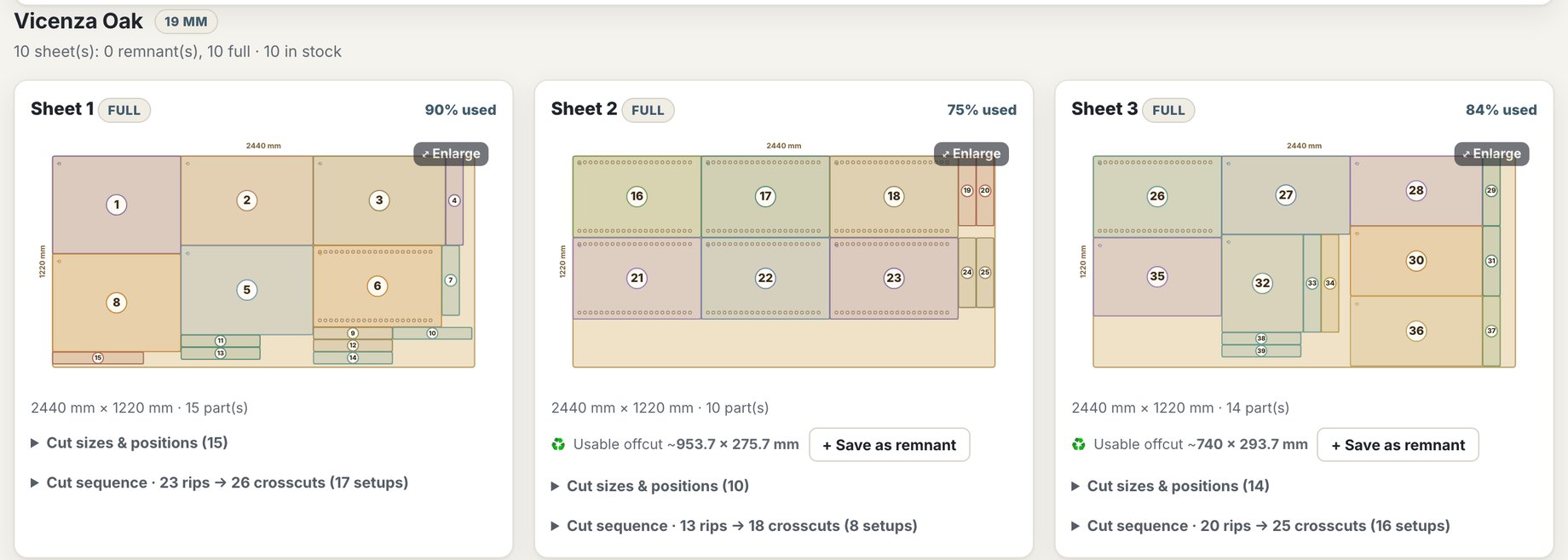
One click sends the whole bank across. Every part gets a place on your real sheets, turned where the grain allows it and spaced by the kerf your machine actually cuts, and whatever is left over comes back as an offcut you can spend on the next job.
Carcass Back and nailers Trays Fascia Edgebanded edge Offcut kept
One sheet from a four-cabinet bank, drawn from a real layout. Your own numbers depend on your sheets, your kerf and what you are building. You can also tell it to spend your leftover remnants before it opens a fresh sheet.
This is the planner, running.
The drawings above explain how it works. Below is one wall taken all the way through, from the Systainers on the shelf to the parts on the sheet.
What you own, and what you still have to buy
Tell it how many of each you already have. As you place Systainers on the wall it keeps a running total of what the plan needs beyond that, so the shopping list writes itself instead of getting guessed at the till.
| Systainer | Owned | Placed | To buy |
|---|---|---|---|
| Systainer³ M 137 | 6 | 8 | 2 |
| Systainer³ M 187 | 4 | 4 | 0 |
| Systainer³ M 337 | 2 | 3 | 1 |
| Systainer³ M 437 | 0 | 2 | 2 |
| Systainer³ L 237 | 1 | 3 | 2 |
Whatever unit you think in
Set the wall in feet and the cabinets in millimetres if that is how your head works. Every field reads and writes in the unit you chose.
You start on a finished wall
Your first sign-in opens a sample project that is already planned. Pull it apart to see how it works, or start a blank one whenever you are ready.
In the pipeline.
Two things are coming, and both will reach everyone on a plan at no extra cost.
See the bank in 3D.
Walk around the wall before you cut it. Spin it, look down the run, and see whether it reads right in the room and not just on an elevation. The 3D view already runs in CabDesign, the cabinet suite StackDesign is part of, and it will land here too.
More Systainers, more brands.
The catalog grows as Systainers get measured. New Systainer models go in as they ship, and more of the brands making Systainers in that format go in beside the five already here. A whole new system is a bigger job, and it gets its own bay on the board further up.
What it costs after the beta
Nobody is being charged for any of these today. Every plan opens the whole tool, so what changes between them is how many projects you get and what you pay. When the beta ends, an account with no card on file moves to our free plan: the planner stays open, and cut lists come with a paid plan.
Free during the open beta
See whether it plans the wall you actually have.
No card needed, and nothing renews
- All 217 Systainers and the sizing math
- The cut list and the sheet layout
- A finished sample wall to pull apart
- Nothing held back for the paid plans
Unlimited
For anyone whose next wall is already on the whiteboard.
Unlimited projects, cancel any time
- As many walls, vans and carts as you like
- Your materials library shared across every one
- Projects saved and synced to every machine you sign in from
- The 3D view and new Systainer brands the day they land
Nothing is being billed while the beta runs.
Single project
For the one wall you have been meaning to build.
One-time payment, no subscription
- One project, kept for as long as you want it
- The same catalog, cut list and sheet layout
- Edit it as often as you like while you build
- Nothing renews and nothing expires
14-day money-back guarantee, no questions asked.
None of this is running yet. You sign up and the whole tool is free while the open beta lasts, until December 31, 2026. When it ends you will hear from us first, and then you decide whether this is an unlimited thing or a one-wall thing. The open beta terms cover how it works.
StackDesign is part of CabDesign.
CabDesign is the full cabinet design product, and StackDesign is one of its modules, sold on its own for people whose next job is a wall of Systainers rather than a kitchen. You can buy the whole thing or buy just this piece. If you are designing a whole room, start at cabdesign.app. A CabDesign plan covers StackDesign too, at the level that includes it, and both sites share one account, so you only ever sign in once. More modules are coming and each one will work this way.
Questions people ask first.
They all live on a page of their own: which Systainers and brands are in the inventory, what the free beta covers, what it costs, and how the cut list works.
More reading: sizing one Systainer at a time in the Systainer size guide, turning a finished bank into cut sizes in the cabinet cut list guide, and laying out the wall itself with Systainer storage ideas.
Your Systainer wall, sized right the first time.
Tell it what is on your shelf and it hands back a wall you can cut. Free while the open beta runs, and no card to hand over first.
Start freeBuilt on the same engine as CabDesign, the full cabinet design suite from the same shop.